提高调试.net cf程序效率一些技巧

最近在写PPC程序,反复的调试程序以后总结了一些提高调试效率的方法。

  • 首先最好要有一个真实的PDA。模拟器的运行速度比真实的PDA速度慢很多。
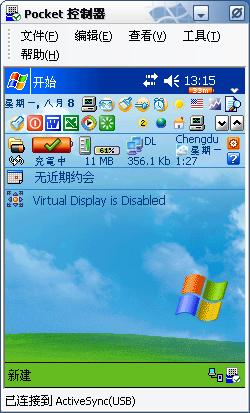
  • 推荐PDA Controller Professional。用于远程控制PDA,放在桌面上并设置为PDA一连接就启动。可以实时的看到PDA上的画面并提供软启动、任务管理,文件管 理,屏幕截图,操作录像等功能。这就不用每次都去看、去点PDA屏幕,而且输入直接用键盘,挺快的。软启动功能就不用说了吧,经常遇到共享冲突的时候就会 起到很大的作用。

下面是他的一个截图:

另外我在PDA上还安装了Battery Pack Pro这个软件,方便关闭程序。

. 安装.NET CF SP3。安装后发现程序启动和调试速度有明显的提高。
. 如果有VS2005的话可以用它写程序。更好的IDE和更完美的提示可以免除很多烦恼。例如有些时候Dim tmp as OneClass忘了加new关键字,而在后来又使用了tmp.Method(),可就麻烦了,调试器会提示出错,很多时候强行中止程序会导致共享冲突, 无法继续调试。这时候只好软启动。而VS2005里面如果没有初始化的话会给出提示。
. ……继续总结中……先就写到这儿。

.Net CF下精确的计时器

.Net CF下精确的计时器

用法:

Dim t as New AtomicCF.Timer
t.start()
....'Some functions here
Dim TimeLapsed as Long = t.stop()

代码:

Imports System.Runtime.InteropServices
Namespace AtomicCF

Public Class Timer
<DllImport("coredll.dll", EntryPoint:="QueryPerformanceCounter")> _
Public Shared Function QueryPerformanceCounter(ByRef perfCounter As Long) As Integer
End Function

<DllImport("coredll.dll", EntryPoint:="QueryPerformanceFrequency")> _
Public Shared Function QueryPerformanceFrequency(ByRef frequency As Long) As Integer
End Function

Private m_frequency As Int64
Private m_start As Int64

Public Sub New()
If QueryPerformanceFrequency(m_frequency) = 0 Then
Throw New ApplicationException
End If
'Convert to ms.
m_frequency = CLng(m_frequency / 1000)
End Sub

Public Sub Start()
If QueryPerformanceCounter(m_start) = 0 Then
Throw New ApplicationException
End If
End Sub


        Public Function [Stop]() As Int64
            Dim lStop As Int64 = 0
            If QueryPerformanceCounter(lStop) = 0 Then
                Throw New ApplicationException
            End If
            Return CLng((lStop - m_start) / m_frequency)
        End Function
    End Class
End Namespace

Control your PDA's LED

I wrote a VB.NET class named LED to control PDA’s LED.

我写了一个名为LED的类来控制PDA的LED灯。
Please see http://www.pocketpcdn.com/articles/led.html first to help understand the core of this class.

请首先阅读http://www.pocketpcdn.com/articles/led.html,这将有利于你理解这个类
And here is the class:

以下是这个类:

Imports System.runtime.InteropServices

Public Class LED
Private Structure NLED_SETTINGS_INFO
Public LedNum As UInt32
Public OffOnBlink As UInt32
Public TotalCycleTime As Integer
Public OnTime As Integer
Public OffTime As Integer
Public MetaCycleOn As Integer
Public MetaCycleOff As Integer
End Structure

Private Structure NLED_COUNT_INFO
Public cLeds As Integer
End Structure

Private Const NLED_COUNT_INFO_ID = 0
Private Const NLED_SETTINGS_INFO_ID = 2

Private Declare Function NLedGetDeviceInfo Lib "coredll.dll" (ByVal nID As Integer, ByRef pOutput As NLED_COUNT_INFO) As Boolean
Private Declare Function NLedSetDevice Lib "coredll.dll" (ByVal nID As Integer, ByRef pOutput As NLED_SETTINGS_INFO) As Boolean

Public Enum Status
OFF
[ON]
BLINK
End Enum

Public Function GetLedCount() As Integer
Dim nci As NLED_COUNT_INFO
Dim wCount As Integer = 0
If NLedGetDeviceInfo(NLED_COUNT_INFO_ID, nci) Then
wCount = CInt(nci.cLeds)
End If
Return wCount
End Function

Public Sub SetLedStatus(ByVal wLed As Integer, ByVal wStatus As Status)
Dim nsi As NLED_SETTINGS_INFO
nsi.LedNum = System.Convert.ToUInt32(wLed)
nsi.OffOnBlink = System.Convert.ToUInt32(wStatus)
NLedSetDevice(NLED_SETTINGS_INFO_ID, nsi)
End Sub

End Class

And the test form is here:

这儿是用于测试窗体:

Imports System
Imports System.Collections
Imports System.Text
Public Class Form1
Inherits System.Windows.Forms.Form
Friend WithEvents MenuItem1 As System.Windows.Forms.MenuItem
Friend WithEvents MenuItem2 As System.Windows.Forms.MenuItem
Friend WithEvents MainMenu1 As System.Windows.Forms.MainMenu

#Region " Windows 窗体设计器生成的代码 "

Public Sub New()
MyBase.New()

'该调用是 Windows 窗体设计器所必需的。
InitializeComponent()

'在 InitializeComponent() 调用之后添加任何初始化

End Sub

'窗体重写 dispose 以清理组件列表。
Protected Overloads Overrides Sub Dispose(ByVal disposing As Boolean)
MyBase.Dispose(disposing)
End Sub

'注意: 以下过程是 Windows 窗体设计器所必需的
'可以使用 Windows 窗体设计器修改此过程。
'不要使用代码编辑器修改它。
Friend WithEvents Label1 As System.Windows.Forms.Label
Friend WithEvents Label2 As System.Windows.Forms.Label
Friend WithEvents Panel1 As System.Windows.Forms.Panel
Friend WithEvents rbLED As System.Windows.Forms.RadioButton
Friend WithEvents rbOn As System.Windows.Forms.RadioButton
Friend WithEvents rbOff As System.Windows.Forms.RadioButton
Friend WithEvents rbBlink As System.Windows.Forms.RadioButton
Private Sub InitializeComponent()
Me.MainMenu1 = New System.Windows.Forms.MainMenu
Me.MenuItem1 = New System.Windows.Forms.MenuItem
Me.MenuItem2 = New System.Windows.Forms.MenuItem
Me.rbLED = New System.Windows.Forms.RadioButton
Me.Label1 = New System.Windows.Forms.Label
Me.Label2 = New System.Windows.Forms.Label
Me.Panel1 = New System.Windows.Forms.Panel
Me.rbOn = New System.Windows.Forms.RadioButton
Me.rbOff = New System.Windows.Forms.RadioButton
Me.rbBlink = New System.Windows.Forms.RadioButton
'
'MainMenu1
'
Me.MainMenu1.MenuItems.Add(Me.MenuItem1)
'
'MenuItem1
'
Me.MenuItem1.MenuItems.Add(Me.MenuItem2)
Me.MenuItem1.Text = "菜单"
'
'MenuItem2
'
Me.MenuItem2.Text = "退出"
'
'rbLED
'
Me.rbLED.Checked = True
Me.rbLED.Location = New System.Drawing.Point(24, 48)
Me.rbLED.Size = New System.Drawing.Size(60, 16)
Me.rbLED.Text = "0"
'
'Label1
'
Me.Label1.Location = New System.Drawing.Point(12, 24)
Me.Label1.Size = New System.Drawing.Size(80, 16)
Me.Label1.Text = "LED No."
'
'Label2
'
Me.Label2.Location = New System.Drawing.Point(120, 24)
Me.Label2.Size = New System.Drawing.Size(80, 16)
Me.Label2.Text = "LED Status"
'
'Panel1
'
Me.Panel1.Controls.Add(Me.rbOn)
Me.Panel1.Controls.Add(Me.rbOff)
Me.Panel1.Controls.Add(Me.rbBlink)
Me.Panel1.Location = New System.Drawing.Point(136, 48)
Me.Panel1.Size = New System.Drawing.Size(76, 96)
'
'rbOn
'
Me.rbOn.Location = New System.Drawing.Point(6, 36)
Me.rbOn.Size = New System.Drawing.Size(38, 20)
Me.rbOn.Text = "On"
'
'rbOff
'
Me.rbOff.Checked = True
Me.rbOff.Location = New System.Drawing.Point(6, 8)
Me.rbOff.Size = New System.Drawing.Size(38, 20)
Me.rbOff.Text = "Off"
'
'rbBlink
'
Me.rbBlink.Location = New System.Drawing.Point(8, 64)
Me.rbBlink.Size = New System.Drawing.Size(52, 20)
Me.rbBlink.Text = "Blink"
'
'Form1
'
Me.ClientSize = New System.Drawing.Size(234, 270)
Me.Controls.Add(Me.Panel1)
Me.Controls.Add(Me.Label2)
Me.Controls.Add(Me.Label1)
Me.Controls.Add(Me.rbLED)
Me.Text = "PPC LED Demo"

End Sub

#End Region

Public LED As New LED

Private Sub Button1_Click(ByVal sender As System.Object, ByVal e As System.EventArgs)
Me.Text = LED.GetLedCount()
End Sub

Private Sub Button2_Click(ByVal sender As System.Object, ByVal e As System.EventArgs)
Dim wLed As Integer = CInt(InputBox("Led", , "0"))
Dim wStatus As Integer = CInt(InputBox("Status", , "1"))
LED.SetLedStatus(wLed, wStatus)
End Sub

Private Sub rbOff_CheckedChanged(ByVal sender As System.Object, ByVal e As System.EventArgs) Handles rbOff.CheckedChanged
LED.SetLedStatus(0, LED.Status.OFF)
End Sub

Private Sub rbOn_CheckedChanged(ByVal sender As System.Object, ByVal e As System.EventArgs) Handles rbOn.CheckedChanged
LED.SetLedStatus(0, LED.Status.ON)
End Sub

Private Sub rbBlink_CheckedChanged(ByVal sender As Object, ByVal e As System.EventArgs) Handles rbBlink.CheckedChanged
LED.SetLedStatus(0, LED.Status.BLINK)
End Sub

Private Sub Form1_Load(ByVal sender As System.Object, ByVal e As System.EventArgs) Handles MyBase.Load

End Sub
End Class

修改Windows序列号的脚本

修改Windows序列号的脚本

'
' WMI Script - ChangeVLKey.vbs
'
' This script changes the product key on the computer (XP SP1 SP2 2003)
'
' Made by zyling.
'***************************************************************************
do
ON ERROR RESUME NEXT

Dim VOL_PROD_KEY
if Wscript.arguments.count<1 then
VOL_PROD_KEY=InputBox(" 使用说明(OEM版无效):"&vbCr&vbCr&" 本脚本程序将修改当前 Windows 的序列号。请先使用算号器算出匹配当前 Windows 的序列号,复制并粘贴到下面空格中。"&vbCr&vbCr&"输入序列号(默认为 XP VLK):","Windows XP/2003 序列号更换工具","PJVCV-XCPPF-6GTKK-QXRPY-FBKGJ")
if VOL_PROD_KEY="" then
Wscript.quit
end if
else
VOL_PROD_KEY = Wscript.arguments.Item(0)
end if

VOL_PROD_KEY = Replace(VOL_PROD_KEY,"-","") 'remove hyphens if any

for each Obj in GetObject("winmgmts:{impersonationLevel=impersonate}").InstancesOf ("win32_WindowsProductActivation")

result = Obj.SetProductKey (VOL_PROD_KEY)

if err = 0 then
Wscript.echo "您的 Windows CD-KEY 修改成功。请检查系统属性。"
end if

if err <> 0 then
Wscript.echo "修改失败!请检查输入的 CD-KEY 是否与当前 Windows 版本相匹配。"
Err.Clear
end if

next
loop