关于在Java中 a!=a 值为真的解释

In java spec , the primitive type is implemented in a certain defined way. The floating-types are implemented in IEEE-754 standard.
Ref from java spec:
The IEEE 754 standard includes not only positive and negative sign-magnitude numbers, but also positive and negative zeros, positive and negative infinities, and a special _Not-a-Number _value (hereafter abbreviated as “NaN”). The NaN value is used to represent the result of certain invalid operations such as dividing zero by zero.
So, in this case , java specified that a!=a is true if the variable is NaN. So does the case i present yesterday (a<b)==(a>=b) if either a or b is NaN.
Now I wil give you a example show it:
………
double a=0;
double b=0;
a=a/b;
if(a!=a) System.out.println(“OK, a!=a is true!”);
if((a<b)==(a>=b)) System.out.println(“……..”);

But I think the problem is a little tricky, If you have not yet read something from the java spec or something other, you will not know that. But when the problem been proposed to us ,we should think about the problem in a logical way ,but not the way coding it to see if a=0, and then a!=a is false. What i want to see is not the result of this ,but the thinking way of the job seeker.

.net 2.0里面也是这样

Module Test
Sub Main()
Dim a as double=0
Dim b as double=0
a=a/b
console.writeline(“a ={0}”,a)
console.writeline(“a<>a ={0}”,a<>a)
console.writeline(“a=a ={0}”,a=a)
console.writeline(“a<b ={0}”,a<b)
console.writeline(“a>b ={0}”,a>b)
console.writeline(“a=b ={0}”,a=b)
End Sub
end module

结果:
a =非数字
a<>a =True
a=a =False
a<b =False
a>b =False
a=b =False
最新发表在CodeProject上的关于手机数据传输的文章!

终于给我发出来了。文章都是一个星期之前写的了,估计是因为文章结构比较复杂,所以编辑花费了很大的时间修改网页的结构和做截图而迟迟没有发出来。昨天看到文章出来了,而且大家的回复看出来对我的文章是持肯定态度的,感觉挺高兴的:)

文 章阐述了我之前在做手机文件传输方面的一些心得,包括几种我做过的手机的数据传输方式。文章采用TopDown方式,重点介绍了OBEX和FBUS两种数 据传输方式,顺带介绍了Plug-In方案,还有推荐一些工具和软件用于研究这个领域。应该说这篇文章算是比较系统的介绍了文件传输的基础知识,为进一步 的研究数据传输提供一个方向和途径。

文章附带一些精简和整理过的源代码,为VB.NET代码,用VS2005打开。其中OBEX部分是我学过设计模式以后重新设计过的,易用性和可扩展性都做得不错。

文章连接如下:
http://www.codeproject.com/Articles/13452/A-Simple-Guide-To-Mobile-Phone-File-Transferring

希望大家捧场哦:)如果觉得小弟文章写得可以,请为文章头上一票,谢谢!如果发现有不足,也恳请提出,小弟今后改正!

终于明白了KDevelop里面如何调试控制台程序了

找了好久也不知道KDevelop里面如何调试控制台程序,后来阅读Kdevelop上面的FAQ终于找到了答案~~~

Debugging a console application : How do I get the console to show so I can enter data?
In the Project Options dialog, go to the Debugger tab and check Enable separate terminal for application IO

~~~~就是一句话,简简单单,让我迷惑了很久~~~~

郁闷,是说linux装不上了,结果是硬盘出现坏道了……!

上次换了一个希捷200G的硬盘,今天进入SuSE Linux感觉速度缓慢,然后安装Mandriva Linux频繁报错,我还以为是安装光盘的问题,后来安装倒是安装上了,可是重新安装SuSE的时候无法Mount硬盘,硬盘发出不正常的声音。完了,我 想一定是坏道了。后来把SeaTools拿来测试了一下,确实如此,后面20G出现了异常多的坏道,成片成片的出现……~郁闷了。还好很多碎片出现在 Pagefile.sys处,还有linux分区里面。

我就郁闷了,怎么会这样呢?我有个希捷80G的硬盘用了很久也没有遇到这样的事情,笔记本的东芝30G硬盘一直在BT下载都没有问题,这个200G的才用不到1个月……!!

哎,又要找经销商去了,郁闷得很……~

在PocketPC上使用Opera Mini

今天在手机上下载了一个Opera Mini,发现极好用,由于网页在显示之前被Opera服务器处理,所以在保持网页的结构的同时省了很多的流量。后来在PocketPC上用Java虚拟机也安装上了一个Opera Mini,这样就可以用大屏幕浏览了。呵呵:)

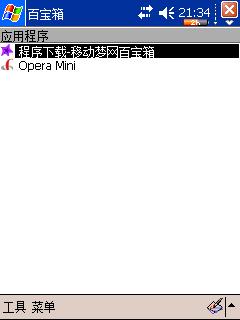
首先需要下载一个“中国移动百宝箱”(http://bbs.pdafans.com/viewthread.php?tid=117911),其实也就是一个Java虚拟机。安装上……

其次,下载Opera Mini,放到PocketPC根目录中,点击Opera.jad安装。

然后,就尽情使用吧:)

注意对于没有按键的PocketPC用起来可能有些问题。在我的HP1937上面用上下左右移动光标,中间的键确定。由于中文比较小,所以浏览起来还是有些遗憾。期待Opera for PocketPC的出现……

以下是几个截图: